Get Started

Configuration
Get Started
Configuration
Configuration
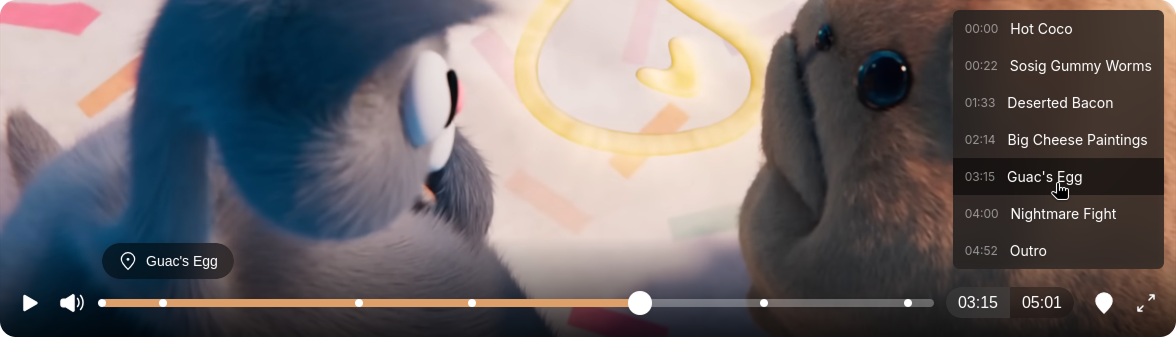
Nekoma chapters feature are used to segment a video into smaller, labeled sections, acting as a “Table of contents” for your viewers. Allowing them to easily navigate quickly to other segments, by using the Chapters menu that is available in the right side of the controls.
Similiar to how subtitles work, chapters use a Video Text Track(VTT) file to indicate where the chapters start and end, for example this is the one for Soggy Dreams video display on the demo site for Nekoma:
WEBVTT

00:00:00.000 --> 00:00:55.000
Hot Coco

00:00:22.000 --> 00:01:33.000
Sosig Gummy Worms

00:01:33.000 --> 00:02:14.000
Deserted Bacon

00:02:14.000 --> 00:03:15.000
Big Cheese Paintings

00:03:15.000 --> 00:04:00.000
Guac's Egg

00:04:00.000 --> 00:04:52.000
Nightmare Fight

00:04:52.000 --> 00:04:52.000
Outro
The first part is the start and end timestamp, along with the second part being the label:
00:02:14.000 --> 00:03:15.000
Big Cheese Paintings
To enable chapters for the Nekoma player, use the Chapters option with the URL to the VTT file:
<Nekoma Chapters="/chapters/video-name.vtt"/>When you use the Chapters option, the menu button for it will be enabled automatically.